TOP Server Historian Plug-In - Unlimited Channel & Devices, 10K Tags And IO Driver + 1 Year Support & Maintenance Agreement
- Details
- Why Choose This Driver?
- Resources and Documentation
- Common Features
- Supported Devices
- Key Features & Benefits
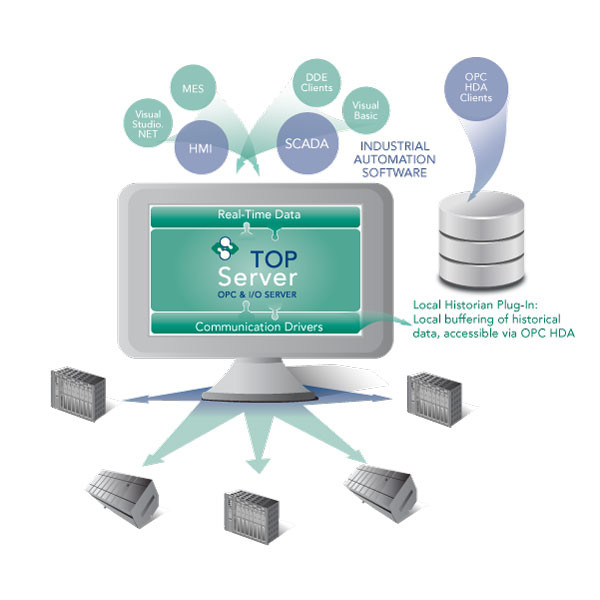
The TOP Server® Local Historian Plug-in is used in conjunction with any other TOP Server driver that is collecting data from devices or other data servers to create a local historical data store.
The TOP Server Local Historian Plug-In moves data collection, storage and access closer to the data source to prevent data loss and improve operational efficiency. Because the Local Historian plugs directly into TOP Server, it can connect to any device and add devices in real-time without operational downtime. This plug-in architecture simplifies configuration, provides the required flexibility and makes the information accessible across OPC HDA, an open standard.
Available as either a 500 tag or 10,000 tag option, the TOP Server Local Historian Plug-In is NOT intended as a replacement or alternative to enterprise level historian solutions. Instead, the Local Historian Plug-In is intended for smaller volumes of data and will complement the powerful functionality of enterprise historian solutions in many situations including remote, isolated locations such as off-shore oil/gas drilling rigs, secure facilities such as laboratories, smaller operations where historical needs are small and an enterprise solution doesn't fit yet, and where validation of stored data is desired for the enterprise historian.
Proven benefits that help you deploy faster and operate more reliably
Fast Setup & Deployment
Configure in minutes with intuitive setup wizards
Enterprise-Grade Security
Encrypted connections and role-based access control
Real-Time Performance
Sub-second updates with optimized polling algorithms
Unlimited Scalability
Support for hundreds of devices per channel
Everything you need to get started, configure, and troubleshoot your driver
TOP Server Operating System Support
Compatible operating systems
Current/Past Release Notes
Latest updates and improvements
Local Historian Plug-In Help File (PDF)
Complete plug-in documentation
TOP Server How-To Videos / Tutorials
Step-by-step video tutorials for TOP Server
TOP Server How-To Application Notes
Technical guides and best practices
TOP Server Quick Start Guide
Get up and running quickly
TOP Server Troubleshooting Guide
Solutions to common issues
Historical Data Reporting Made Easy
Video tutorial with Dream Report and TOP Server
Software Toolbox Knowledge Base
Searchable FAQs and tech notes
- OPC HDA 1.20 Support – Supports access to historical data via OPC Historical Data Access (HDA) 1.20 standard
- Flexible Data Collection – Collects data consisting of a value, quality, and timestamp from any TOP Server data source (drivers, advanced plug-ins, or system tags)
- Configurable Archive Management – Configurable historical archive file spanning (rollover to new file after specified hours/days or when reaching defined file size) and retention policies
- Multi-threaded Architecture – High scalability multi-threaded architecture for optimal performance with thousands of tags
- Runtime Configuration – Runtime changes via wizard-based configuration interface with intuitive Properties Editor
- Enterprise Features – Secure User Management, Built-in Device/Network Redundancy, and Auto-Demotion (Slow Polling)
Integration
- Any devices or data sources supported by TOP Server drivers
- Collects data from any connected device or data server via TOP Server
Note: For a complete list of supported models and firmware versions, please contact our technical support team or download the driver documentation.
Everything you need for reliable industrial connectivity
Real-Time Data Access
Access live process data from your devices with minimal latency and maximum reliability.
Device Configuration
Read and write configuration parameters directly from your SCADA or HMI application.
Automatic Reconnection
Intelligent connection management automatically recovers from network interruptions.
Multi-Protocol Support
Supports multiple communication protocols for flexible deployment options.
High Performance
Optimized algorithms deliver maximum throughput with minimal system overhead.
Diagnostic Logging
Comprehensive logging helps troubleshoot issues and monitor driver performance.