Siemens Plus Suite TOP Server + 1 Year License Maintenance

- Details
- Resources and Documentation
- Technical Specifications
- Key Features
- Advanced Features
- Key Benefits
- Why Choose This Product?
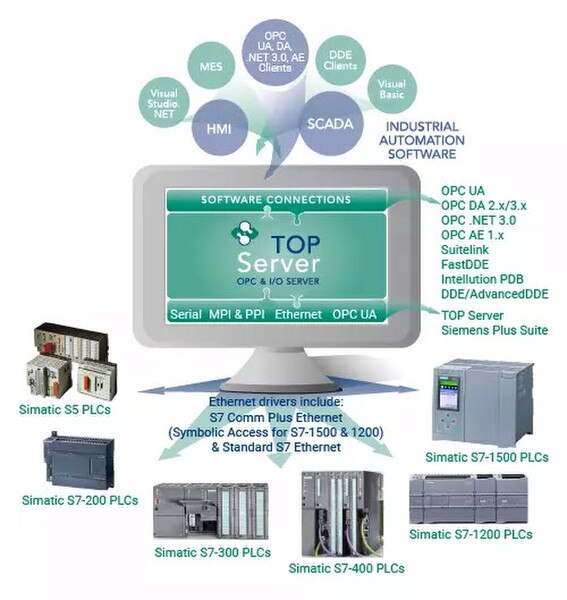
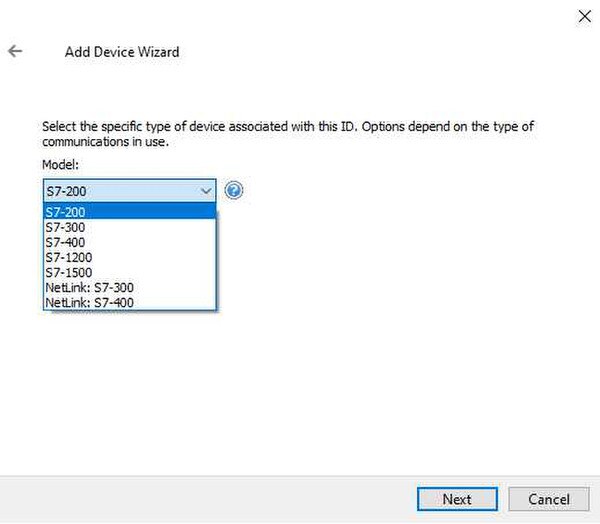
The TOP Server Siemens Plus Suite delivers strong value by including seven drivers that support a wide range of connectivity options for Siemens S5 and S7 PLCs. Whether you need serial or Ethernet connectivity to Siemens controllers, this suite provides flexible options, including S7 MPI connectivity.
Especially valuable for manufacturing teams running Siemens S7-1500 controllers across machining, assembly, robotics, packaging, and material handling operations who need symbolic tag access without extra hardware.
Drivers Included in this Suite:
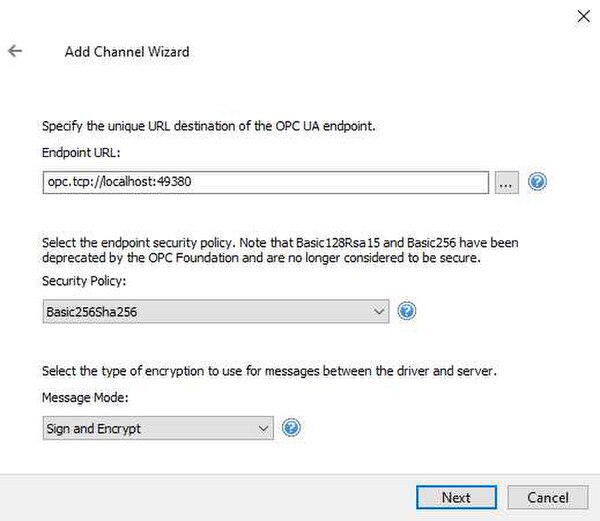
This suite adds both S7 Plus Ethernet and OPC UA Client connectivity for access to S7 1500 and S7 1200 controllers, enabling access to symbolic variables including arrays, structures, and UDTs, as well as optimized block access. Both methods are Siemens approved. Note: The OPC UA method applies to S7 1500 controllers with firmware version 2.0.1 or newer.
If you only need classic S7 Ethernet connectivity without symbolic addressing, use the Siemens S5 S7 Suite instead. Prefer a subscription? Contact us for annual subscription pricing on this suite.
Everything you need to get started, configure, and troubleshoot your driver
- TOP Server Operating System Support
- TOP Server Siemens S7 TCP/IP Ethernet Driver Quick Start Video
- TOP Server Siemens S7 Plus Ethernet Driver Quick Start Video
- TOP Server How-To Videos / Tutorials
- TOP Server How-To Application Notes
- TOP Server Quick Start Guide
- TOP Server Troubleshooting Guide
- Siemens S7 Plus Ethernet Help File (PDF)
- Siemens S7 Ethernet OPC Help File (PDF)
- Siemens TCP/IP Server Ethernet Help File (PDF)
- Siemens S7-200 PPI/PPM Serial Help File (PDF)
- Siemens S7-MPI Help File (PDF)
- Siemens S5 3964/3964R Serial Help File (PDF)
- Siemens S5 AS511 Serial Help File (PDF)
- OPC UA Client Help File (PDF)
- TOP Server current/past release notes
- Siemens Supported Devices
- Support Portal
- TOP Server Specific Blog Posts
- Overall Software Toolbox Blog Posts
- Subscribe to Blog
- TOP Server Data Sheet (PDF)
- TOP Server License Agreement
- Using the Siemens S7 Ethernet OPC Driver
- TOP Server Quick Start Video for Siemens S7 Ethernet OPC
- Siemens Supported Devices (Learn More)
- Automatic Tag Generation (Overview)
- Free Demo Download
- Licensing Information
- TOP Server Security & User Management
Communication
Protocols Supported
S7 Plus, S7, S5, ISO-on-TCP, MPI, PPI, PPM, 3964R, AS511, OPC UA
Connection Types
Ethernet TCP/IP, Serial RS-232/422/485, MPI, OPC UA
Max Devices per Channel
256 channels, varies by driver (16-256 devices per channel)
Advanced communication performance handling features (see Advanced Features tab)
Flexible system architecture with support for solicited and unsolicited communications
Automatic Static Tag Generation from STEP 7 project directories for S7-300 and S7-400 models for easy data discovery and integration
Ethernet Encapsulation support for Serial protocol drivers
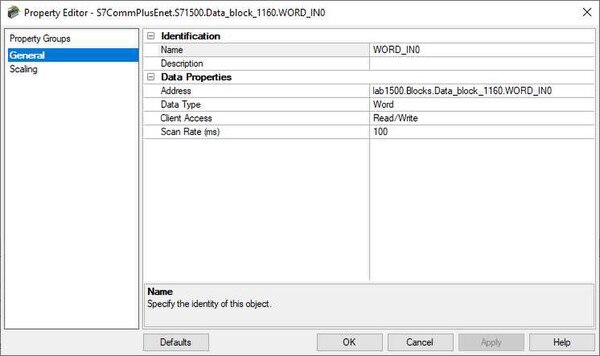
Supports Symbolic Addressing and Optimized Data Blocks for both S7-1500 and S7-1200 controllers via S7 Comm Plus (no OPC UA required)
Supports Symbolic Addressing and Optimized Data Blocks for Siemens S7-1500 controllers via OPC UA
Runtime changes via wizard-based configuration interface with intuitive Properties Editor
Secure User Management
Built-in Device/Network Redundancy
Auto-Demotion (Slow Polling)
Extensive communication and server diagnostics (OPC / Communications / Event Log)
Everything you need for reliable industrial connectivity
Real-Time Data Access
Access live process data from your devices with minimal latency and maximum reliability.
Device Configuration
Read and write configuration parameters directly from your SCADA or HMI application
Automatic Reconnection
Intelligent connection management automatically recovers from network interruptions.
Multi-Protocol Support
Supports multiple communication protocols for flexible deployment options.
High Performance
Optimized algorithms deliver maximum throughput with minimal system overhead.
Diagnostic Logging
Comprehensive logging helps troubleshoot issues and monitor driver performance.
Proven benefits that help you deploy faster and operate more reliably
Fast Setup & Deployment
Configure in minutes with intuitive setup wizards
Enterprise-Grade Security
Encrypted connections and role-based access control
Real-Time Performance
Sub-second updates with optimized polling algorithms
Unlimited Scalability
Support for hundreds of devices per channel
Ratings & Reviews
18 reviews
Thank you for a GREAT product
by Jr Goulet -
The Software Toolbox team did an outstanding job. Great follow up and checking back to find out status. I will certainly recommend Software Toolbox to everyone I can.
I have NEVER had a bad experience with the highly capable tech support group.
Thank you for a GREAT product
Awesome Experience
by Donovan Scorgie -
Awesome Experience
Quick and Seamless
by Moises Tivane -
The Support response quick and seamless
Excellent Response Time
by Anton Bester -
The team response time is excellent.
Attentive and Responsive
by Youssoupha Mbaye -
The technical Consultant that handled my case was very very attentive and responsive. Communication was fluid and the technical recommendations precise.
Quick Response as Always
by J. Todd Kirkland -
Thanks Software Toolbox team
Quick response as always!
Simple and Easy Process
by Matthew Mccomas -
It is always a very simple easy process with you guys.
Follow-Up Timing Issue
by Lopez Jose R -
The only problem I noticed is that when I called, they call me later but at that time I was not in the customer site, so this process is kind of complicated to follow up the problem immediately with the customer. Remember customers avoid to lost productio
Persistent and Dedicated
by Rrricketts -
This case went on way too long, but it was obviously something no one had seen before. Even with that, I really appreciate the time and effort that was dedicated to this.
Very Good Service
by Wimpie Vanniekerk -
Very good service, thank you.
Thank You for Support
by Mohdsyahmi -
thank you for support
Available and Efficient
by F Gauthier -
The Software Toolbox team was very available and very efficient.
Quick, Helpful and Efficient
by Adelaide Belanger -
The service was quick, helpful and efficient. I really like the follow ups and the help I got from the Software Toolbox Team
It is really rare these days that we receive a great support like your team did.
I will not hesitate to write back at the support team if I have a
Helpful Advice and Links
by Danhutton -
The Software Toolbox team was very helpful and provided lots of useful advice and links to help me solve my issue.
Responsive and Pleasant
by Franck Feneon -
The people in charge of assistance are responsive, the answers are precise and the contact is very pleasant.
Fast Service
by Sigurgeir -
Fast service, am happy about it.
Persistent and Dedicated
by Rrricketts -
This case went on way too long, but it was obviously something no one had seen before. Even with that, I really appreciate the time and effort that was dedicated to this.