SNMP Suite TOP Server- 50 Channel/50 Device/Unlimited Tag License and IO Driver + 1 Year Support & Maintenance Agreement"
- Details
- Key Features
- Technical Specifications
- Resources and Documentation
- Supported Devices
- Key Features & Benefits
- Advanced Features
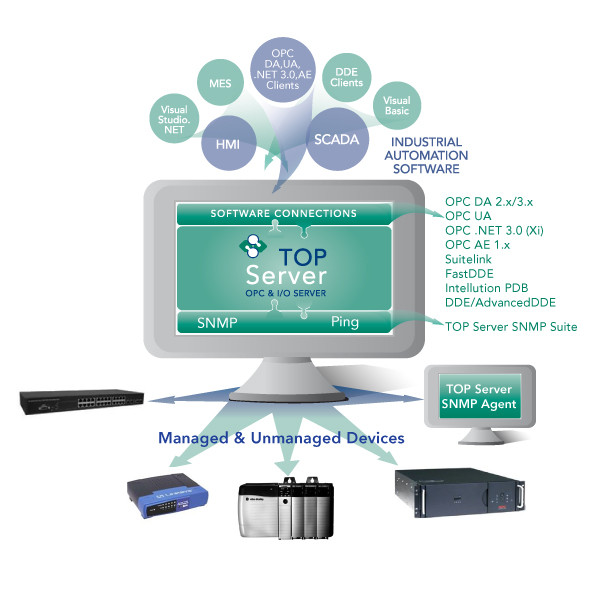
The TOP Server® SNMP Suite provides the ultimate in flexibility for connectivity to the widest range of Managed and Unmanaged Ethernet network devices supporting the SNMP or ICMP (Ping) Protocol and integration to other software applications using OPC DA, OPC UA and AVEVA Suitelink. This software provides automation systems with a timely view of the health of their Ethernet network devices as well as the overall Ethernet network traffic volume and overall Ethernet network status from within their HMI or controls environment. Automation professionals can now reliably incorporate the status of Hubs, Routers, Switches, PCs/Servers, UPS devices, and other Managed or Unmanaged devices directly into their automation systems.
If your goal is the opposite direction (having SNMP Network Managers poll your TOP Server / process data), consider the SNMP Agent plug-in instead.
- Supports monitoring unmanaged devices using the Ping driver (including automatic OPC tag generation for unmanaged devices)
- Includes "specialty tags" intended to provide more context than a single polled OID (examples listed include historical attributes, events tags, table offsets, and ScanFloor)
- Supports automatic tag database generation for simpler configuration / plug-and-play style setup
Communication
Protocols Supported
Simple Network Management Protocol (SNMP), Internet Control Message Protocol (ICMP)
Connection Types
TCP/IP Ethernet, UDP Ethernet
Everything you need to get started, configure, and troubleshoot your driver
TOP Server Operating System Support Information
OS compatibility details
TOP Server How-To Videos / Tutorials
Watch step-by-step tutorial videos
TOP Server How-To Application Notes
Detailed implementation guides
TOP Server Quick Start Guide
Get up and running quickly
TOP Server Troubleshooting Guide
Resolve common issues
SNMP Driver Help File (PDF)
Complete SNMP driver manual
Ping Driver Help File (PDF)
Complete Ping driver manual
TOP Server Data Sheet (PDF)
Product overview and specifications
TOP Server Current/Past Release Notes
Latest updates and version history
TOP Server License Agreement (EULA)
End User License Agreement
TOP Server Specific Blog Posts
Technical articles and best practices
Overall Software Toolbox Blog Posts
Browse all blog articles
Subscribe to Blog
Get updates delivered to your inbox
Software Toolbox Knowledge Base
Comprehensive support articles
Network Infrastructure
- Alarm Management RTUs
- Device Servers
- Industrial Ethernet Switches
- Routers
- Hubs
- Gateways
IT Equipment
- Windows-based PCs and Servers
- Unix-based Servers
- Uninterruptible Power Supplies (UPS)
- Printers
- Scanners
Building & Environment
- Environment Monitoring Equipment for Server Rooms
- Building Control Systems
- HVAC Equipment
- Security Systems
Industrial Automation
- PLCs and Controllers
- Drives
- Sensors
- Any IP/host-addressable device that can communicate over TCP/IP
Note: Don't See Your Device Listed? Contact Us
Everything you need for reliable industrial connectivity
Real-Time Data Access
Access live process data from your devices with minimal latency and maximum reliability.
Device Configuration
Read and write configuration parameters directly from your SCADA or HMI application.
Automatic Reconnection
Intelligent connection management automatically recovers from network interruptions.
Multi-Protocol Support
Supports multiple communication protocols for flexible deployment options.
High Performance
Optimized algorithms deliver maximum throughput with minimal system overhead.
Diagnostic Logging
Comprehensive logging helps troubleshoot issues and monitor driver performance.
- Auto Device Discovery to speed configuration time
- Enhanced MIB file parser import
- Network Analyst feature to generate statistical information
- SNMP trap handling (via events tags and defined trap OIDs) to reduce polling
- SNMP GetBulk command support
- Option to invalidate (instead of deactivate) tags when devices respond with NoSuchInstance / NoSuchObject
- SNMPv1 NoSuchName error handling for Get operations
- Inform support for SNMPv2c/v3 traps/notifications
- Runtime management of polling using Auto-Demotion and the ScanFloor device property
Ratings & Reviews
1 review
Great Experience
by Luis Villanueva -
The Software Toolbox team was quick to respond and provided accurate information. Clear concise instruction to configure what I needed to.
Quick Response from Software Toolbox
by Boitshoko Moetaesi, AB InBev -
Was very helpful, responded to every question. Kept the ticket open even after weeks of no response. Thank you and sorry for the delayed responses.
Quick Solution
by Richard Hart -
You never ever disappoint me with your exceptional service. Everything is always answered promptly, concisely and accurately. I really wish that other vendors in the Automation software space had support skills of even 10% of what yours' are.
Prompt and Problem-Solving
by Boitshoko Moetaesi -
Its great
Quick and Professional
by Dan Strange -
The Software Toolbox team was highly professional and very prompt in their responses.
by Dan Strange -
The Software Toolbox team was highly professional and very prompt in their responses.