OMNI Flow Computer TOP Server + 1 Year License Maintenance

- Details
- Resources and Documentation
- Supported Devices
- Key Features
- Key Benefits
- Why Choose This Product?
- Integration Capabilities
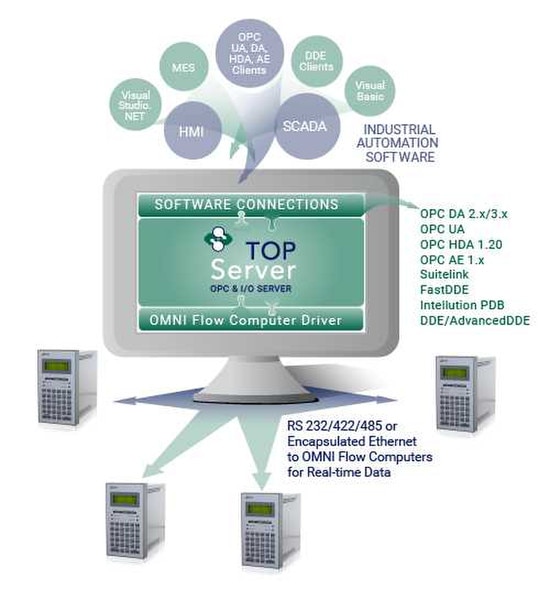
The TOP Server OMNI Flow Computers driver provides comprehensive connectivity to OMNI Flow Computers using Modbus RTU over serial communications, including support for Ethernet-to-serial converters and gateways through Ethernet Encapsulation. For real-time data collection applications, there are no license-based limits on the number of RTUs that can be connected.
This driver includes full support for both OMNI Flow Computer 3000 series and 6000 series devices, exposing real-time process data to your HMI/SCADA systems, historians, MES/ERP applications, and custom software applications. The driver seamlessly integrates with TOP Server's robust OPC DA, OPC UA, and other connectivity options to deliver OMNI device data wherever you need it.
When deployed as part of the TOP Server EFM Suite, the driver gains the ability to collect historical EFM (Electronic Flow Measurement) data for both gas and liquid applications. It works seamlessly with the EFM Exporter plug-in to generate exports in industry-standard formats including Flow-Cal CFX (V5 & V8 Gas, V7 & V8 Liquids), Flow-Cal Transaction Queue, PGAS, CSV, and SQL/ODBC databases for production accounting, optimization, and regulatory compliance use cases.
The OMNI Flow Computer driver is available as a standalone real-time driver for dedicated OMNI applications, or as part of two vertical industry suites: the TOP Server Oil & Gas Suite (real-time only) and the TOP Server EFM Suite (EFM and real-time). These suites provide economical options when you need connectivity to multiple oil & gas protocols.
Everything you need to get started, configure, and troubleshoot your driver
- TOP Server Operating System Support Information
- TOP Server Getting Started Video for OMNI Flow Computers
- TOP Server How-To Videos / Tutorials
- TOP Server How-To Application Notes
- TOP Server V6 Getting Started Guide
- TOP Server Troubleshooting Guide
- OMNI Flow Computer Driver Manual (PDF)
- TOP Server Release Notes
- Software Toolbox Knowledge Base
- TOP Server Support & Maintenance
OMNI Flow Computers
OMNI Flow Computer 3000
OMNI Flow Computer 6000
Note: For a complete list of supported models and firmware versions, please contact our technical support team or download the driver documentation.
Everything you need for reliable industrial connectivity
Real-Time Data Access
Access live process data from your devices with minimal latency and maximum reliability.
Device Configuration
Read and write configuration parameters directly from your SCADA or HMI application.
Automatic Reconnection
Intelligent connection management automatically recovers from network interruptions.
Multi-Protocol Support
Supports multiple communication protocols for flexible deployment options .
High Performance
Optimized algorithms deliver maximum throughput with minimal system overhead.
Diagnostic Logging
Comprehensive logging helps troubleshoot issues and monitor driver performance .
Proven benefits that help you deploy faster and operate more reliably
Fast Setup & Deployment
Configure in minutes with intuitive setup wizards
Enterprise-Grade Security
Encrypted connections and role-based access control
Real-Time Performance
Sub-second updates with optimized polling algorithms
Unlimited Scalability
Support for hundreds of devices per channel
OPC Connectivity
Full OPC DA and OPC UA server functionality enables seamless integration with:
- → SCADA systems (Ignition, Wonderware, GE iFIX)
- → Historians (OSIsoft PI, Canary, InfluxDB)
- → MES and ERP systems
- → Custom applications via OPC client libraries
Cloud Integration
Combine with Cogent DataHub or OPC Router for cloud connectivity:
- → AWS IoT Core and Azure IoT Hub
- → MQTT broker connectivity
- → RESTful API integration
- → Unified Namespace (UNS) architectures