Honeywell Communications TOP Server Suite + 1 Year License Maintenance

- Details
- Resources and Documentation
- Technical Specifications
- Common Features
- Key Features
- Advanced Features
- Key Benefits
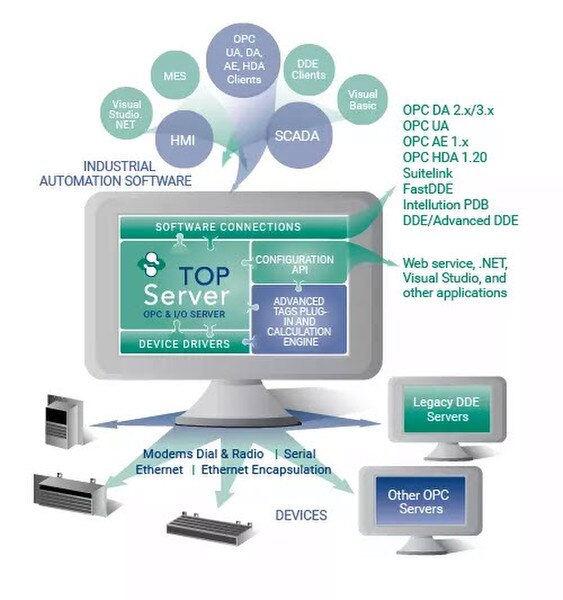
The TOP Server Honeywell Suite of drivers provides the ultimate in flexibility for connectivity to the widest range of devices supporting the Honeywell variations of the Modbus protocols and integration to other software applications using OPC DA, OPC UA and AVEVA SuiteLink.
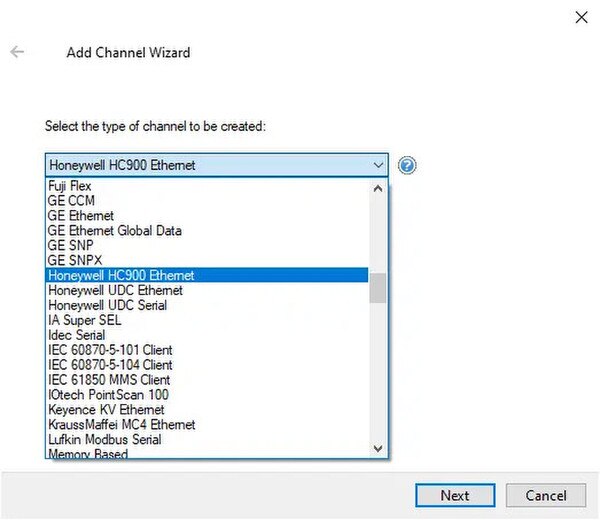
This suite includes connectivity to Honeywell UDC 3000/3300 Series PLCs (Honeywell UDC Modbus protocol over serial or Ethernet) and Honeywell UDC 2500/3200/3300/3500 Series PLCs (Honeywell UDC Modbus Ethernet protocol), as well as Honeywell HC900 Hybrid Controllers (Honeywell HC900 Modbus Ethernet protocol).
Everything you need to get started, configure, and troubleshoot your driver
TOP Server Operating System Support Information
Access additional TOP Server and Honeywell related information.
TOP Server How-To Videos / Tutorials
To ensure you get the most from your investment in TOP Server™, we provide a variety of application notes/guides and how-to videos, since we know that sometimes it helps to see someone showing you how to do things.
TOP Server How-To Application Notes
To ensure you get the most from your investment in TOP Server™, we provide a variety of application notes/guides and how-to videos, since we know that sometimes it helps to see someone showing you how to do things.
TOP Server Quick Start Guide
To ensure you get the most from your investment in TOP Server™, we provide a variety of application notes/guides and how-to videos, since we know that sometimes it helps to see someone showing you how to do things.
TOP Server Troubleshooting Guide
To ensure you get the most from your investment in TOP Server™, we provide a variety of application notes/guides and how-to videos, since we know that sometimes it helps to see someone showing you how to do things.
Honeywell HC900 Ethernet Help File
Access comprehensive help documentation for each driver included in the Honeywell Suite.
Honeywell UDC Ethernet Help File
Access comprehensive help documentation for each driver included in the Honeywell Suite.
Honeywell UDC Serial Help File
Access comprehensive help documentation for each driver included in the Honeywell Suite.
TOP Server Data Sheet
Access product data sheets, release notes, and license information.
Current/Past Release Notes
Access product data sheets, release notes, and license information.
TOP Server License Agreement
Access product data sheets, release notes, and license information.
TOP Server Specific Blog Posts
Real-world use cases, step-by-step how-to's and video tutorials - our blog contains useful resources and information to help you get connected.
Overall Software Toolbox Blog Posts
Real-world use cases, step-by-step how-to's and video tutorials - our blog contains useful resources and information to help you get connected.
Subscribe to Blog
Real-world use cases, step-by-step how-to's and video tutorials - our blog contains useful resources and information to help you get connected.
Looking for Honeywell Hardware?
Access additional TOP Server and Honeywell related information.
Supported Controllers
HC900, UDC 2500/3000/3200/3300/3500
Communication Protocols
Honeywell UDC Modbus, HC900 Modbus
Network Types
Ethernet TCP/IP, RS-232, RS-422, RS-485
Address Range
0-65535 (decimal), 0-FFFF (hex)
Languages
English
- ✔Multi-threaded Architecture– Server utilizes a multi-threaded design for optimal performance and high scalability
- ✔Runtime Configuration Changes – Wizard-based configuration interface with intuitive Properties Editor allows changes without restarts
- ✔Secure User Management – User accounts and roles can restrict access to server functionality
- ✔Built-in Device/Network Redundancy– Native support for redundant devices or communications paths for high availability
- ✔Auto-Demotion (Slow Polling)– Automatically slow down polling to unresponsive devices to optimize communications
- ✔Comprehensive Diagnostics– OPC and communication diagnostics (event logs, etc.) for troubleshooting
- ✔Full Address Range Support– Supports full address range (0 - 65535) and hex addressing (0 - FFFF)
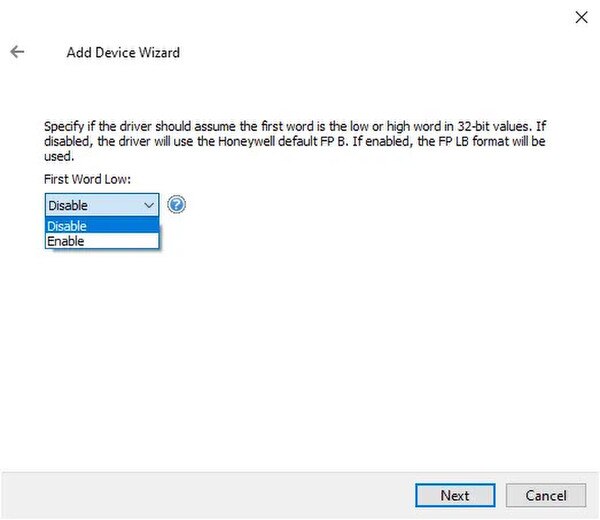
- ✔User-Configurable Block Reads – User-configurable block reads and First Word Lo/Hi option for 32-bit data types
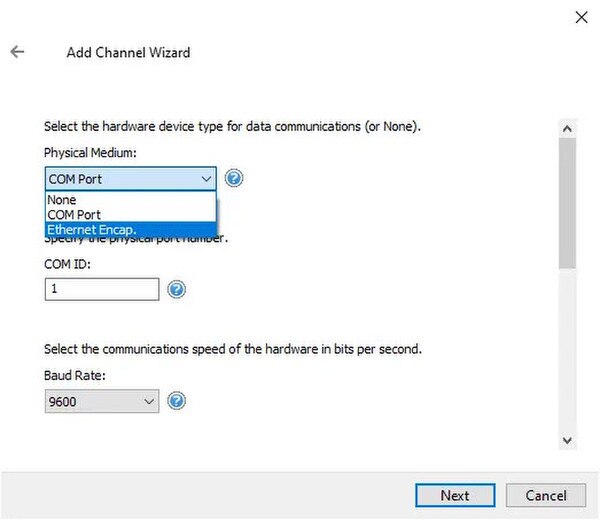
- ✔Ethernet Encapsulation Support – Supports Ethernet encapsulation via Ethernet/Serial converters or terminal servers
- ✔Multi-Drop Support – Supports multi-drop (multiple devices on one connection) for efficient communications
- ✓User configurable block read sizes
- ✓ First Word Lo/Hi byte order option for 32-bit values
- ✓Automatic tag database generation for Ethernet drivers
- ✓Supports multi-drop (multiple devices on one connection)
- ✓ Supports serial-over-Ethernet encapsulation (via device servers)
Real-Time Data Access
Access live process data from your devices with minimal latency and maximum reliability.
Device Configuration
Read and write configuration parameters directly from your SCADA or HMI application.
Automatic Reconnection
Intelligent connection management automatically recovers from network interruptions.
Multi-Protocol Support
Supports multiple communication protocols for flexible deployment options .
High Performance
Optimized algorithms deliver maximum throughput with minimal system overhead.
Diagnostic Logging
Comprehensive logging helps troubleshoot issues and monitor driver performance .