TOP Server Allen-Bradley OPC Server — ControlLogix, PLC5, SLC Driver Suite + 1 Year License Maintenance

- Details
- Resources and Documentation
- Common Features
- Key Features
- Advanced Features
- Key Benefits
- Why Choose This Product?
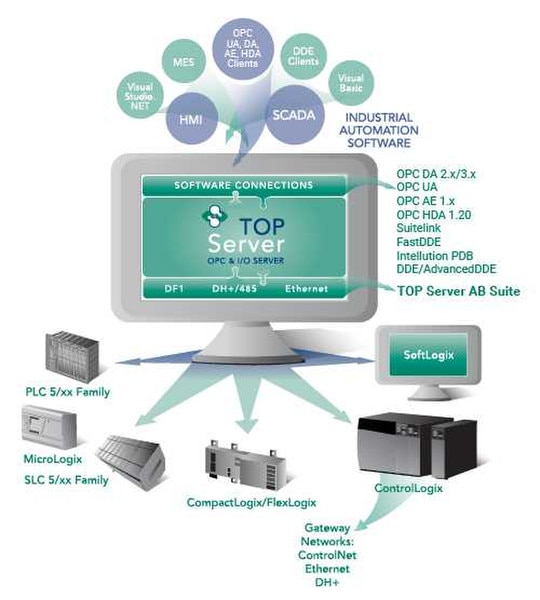
The TOP Server Allen-Bradley Suite provides flexible, high-performance connectivity to a broad range of Rockwell/Allen-Bradley PLCs across industries, with no third-party drivers (no RSLinx) required. It enables data exchange between OPC UA, OPC DA, SuiteLink, and DDE clients and Allen-Bradley controllers, and is kept compatible with legacy, current and future Allen-Bradley equipment (including new firmware versions).
This Suite contains the following OPC drivers:
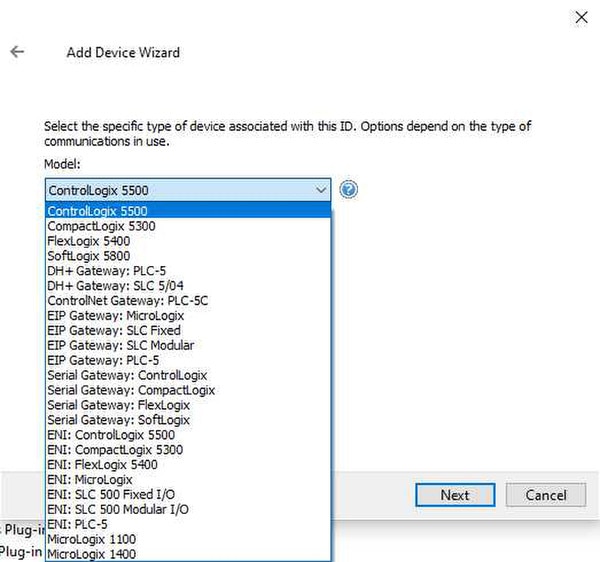
• ControlLogix Ethernet – OPC driver for Allen-Bradley Logix family controllers over EtherNet/IP
• ControlLogix Server Ethernet – OPC driver for unsolicited CIP communications (makes TOP Server act as a Logix PLC memory space)
• Allen-Bradley Ethernet – OPC driver for PLC5, SLC 5/05, and other PLCs using classic Allen-Bradley Ethernet protocol
• Allen-Bradley Server Ethernet – OPC driver for unsolicited PLC-2 compatible Ethernet messages (PLC acting as client to TOP Server)
• Allen-Bradley DF1 Serial – OPC driver for Allen-Bradley DF1 serial protocol (PLC-5, SLC 500, MicroLogix via RS-232/485, including radio modem mode)
• Allen-Bradley Micro800 Ethernet – OPC driver for Micro800 series controllers over EtherNet/IP (CIP)
• Allen-Bradley Micro800 Serial – OPC driver for Micro800 series controllers over serial (Allen-Bradley Fragmentation Protocol, CIP over DF1)
No RSLinx or other third-party communications software is required – these drivers communicate directly with Allen-Bradley devices.
Maintains compatibility with new Allen-Bradley firmware versions through ongoing updates (important for Logix family users).
Supported PLCs by driver (matrix) | Allen-Bradley DH+ connectivity details | Current firmware compatibility info
Everything you need to get started, configure, and troubleshoot your driver
- Operating System Support Information Matrix of Windows OS versions supported by each TOP Server version (Knowledge Base article)
- Quick Start Video - Rockwell ControlLogix Driver Step-by-step video tutorial (8:52) on using the ControlLogix Ethernet driver to collect real-time data from Logix controllers
- TOP Server How-To Videos & Tutorials Library of tutorial videos covering installation, configuration, and features of TOP Server
- TOP Server Application Notes (How-To Guides) Collection of application notes and how-to guides for various TOP Server use cases
- TOP Server Quick Start Guide Guide for new users to quickly set up and configure TOP Server (includes basic concepts and initial setup)
- TOP Server Troubleshooting Guide Comprehensive guide for troubleshooting TOP Server (common errors, diagnostics, and solutions)
- Allen-Bradley ControlLogix Ethernet Driver Manual Complete driver documentation with setup instructions and configuration examples (PDF)
- Allen-Bradley ControlLogix Server Ethernet Manual Documentation for unsolicited CIP communications driver (PDF)
- Allen-Bradley Ethernet Driver Manual Documentation for PLC5, SLC 5/05 classic AB Ethernet protocol driver (PDF)
- Allen-Bradley Server Ethernet Driver Manual Documentation for unsolicited PLC-2 compatible Ethernet messages driver (PDF)
- Allen-Bradley DF1 Serial Driver Manual Documentation for DF1 serial protocol driver (PLC-5, SLC 500, MicroLogix) (PDF)
- Allen-Bradley Micro800 Ethernet Driver Manual Documentation for Micro800 series over EtherNet/IP driver (PDF)
- Allen-Bradley Micro800 Serial Driver Manual Documentation for Micro800 series over serial driver (PDF)
- Allen-Bradley Data Highway Plus (DH+) Driver Manual For TOP Server v6.9 or earlier; DH+ support is deprecated in newer versions (PDF)
- TOP Server Data Sheet Product overview brochure (PDF)
- Release Notes (current & past) Release history and change log for TOP Server versions
- TOP Server License Agreement End-user license agreement and warranty terms for TOP Server
- Optimizing with ControlLogix Protocol Modes (Blog) Technical article on using the ControlLogix Ethernet driver's protocol mode options for performance tuning
- Overall Software Toolbox Blog Main Software Toolbox Tech Tips blog (all product posts)
- Subscribe to Blog Updates Signup page to receive email updates for new blog posts
- Optimizing ControlLogix Communications Guide Guide to performance features for the ControlLogix Ethernet driver (e.g. CIP packet size, SOTS settings, etc.)
- Configuration Choices for ControlLogix Ethernet Guide to understanding and choosing protocol modes and settings for ControlLogix communications
- Allen-Bradley Hardware (Rockwell site) Rockwell Automation Allen-Bradley product homepage (for hardware specifications and purchases)
Built-in TOP Server features included with all AB Suite drivers
- Advanced communication performance handling (optimized multi-threaded I/O, see Advanced Features)
- Flexible architecture supporting both solicited (polled) and unsolicited communications
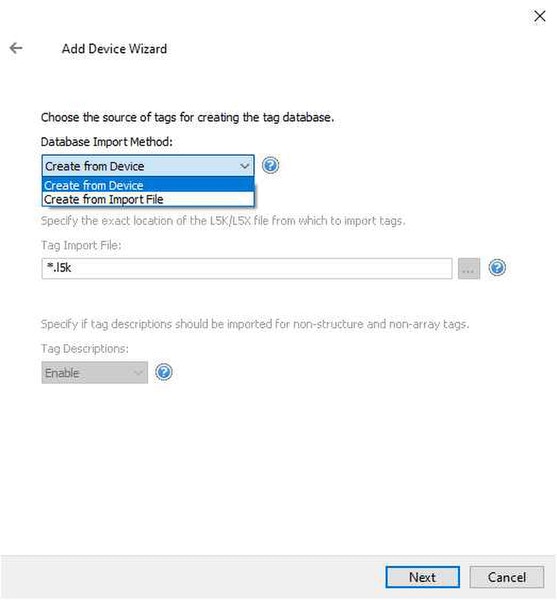
- Automatic Tag Generation for Logix controllers (online direct or offline via import) to simplify tag integration
- Logix device routing through ControlNet, DH+, EtherNet/IP and other networks via bridging modules
- Automatic Tag Generation (ATG) - One-click static tag creation for devices (supported in ControlLogix Ethernet driver; direct from PLC or via .L5X file)
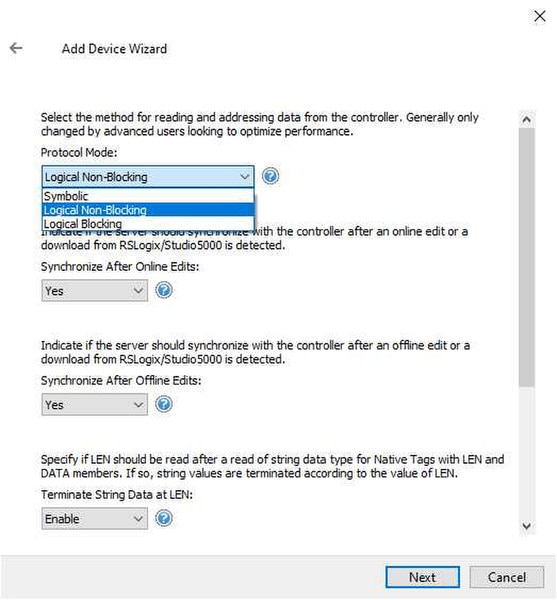
- Configurable Logix Protocol Modes - Selectable communication modes (Symbolic, Logical Non-Blocking, Logical Blocking) for ControlLogix Ethernet driver to optimize performance based on tag count and structure
- Configurable CIP message size - Ability to increase CIP connection packet size (up to 4000 bytes on supported devices) to allow more data per transaction, improving throughput
- CIP multi-request packets - Driver automatically bundles multiple read/write requests into one packet when possible, reducing overhead for high-tag-count applications
Everything you need for reliable industrial connectivity
Real-Time Data Access
Access live process data from your devices with minimal latency and maximum reliability.
Device Configuration
Read and write configuration parameters directly from your SCADA or HMI application
Automatic Reconnection
Intelligent connection management automatically recovers from network interruptions.
Multi-Protocol Support
Supports multiple communication protocols for flexible deployment options.
High Performance
Optimized algorithms deliver maximum throughput with minimal system overhead.
Diagnostic Logging
Comprehensive logging helps troubleshoot issues and monitor driver performance.
Proven benefits that help you deploy faster and operate more reliably
Fast Setup & Deployment
Configure in minutes with intuitive setup wizards
Enterprise-Grade Security
Encrypted connections and role-based access control
Real-Time Performance
Sub-second updates with optimized polling algorithms
Unlimited Scalability
Support for hundreds of devices per channel
Ratings & Reviews
13 reviews
The Go-To AB Suite
by A. Moreno -
This driver is my go to for anything Rockwell. Pair it with advanced tags and you have a powerhouse of convenience and adaptability.
Great Software
by Joe Fuller -
Software is great had a few issues but works great.
Great Product
by Errol Schoenfisch -
Great
Spectacular Service
by Joseph Wills -
Ive used you software since 1998. Differnt company differnt time. Your service has always been spectacular.
Simple and Easy
by Matthew Mccomas -
It is always a very simple easy process with you guys.
License Transfer Resolved
by Michael Mellish -
The Issue was that the AB Suite license couldn't be returned to Software Toolbox to transfer to another Virtual Machine. Tech Supported provided another activation ID to use on the new server that solved the problem.
Quick and Clear
by Jhunior Ruiz -
Quick and clear response
Fast and Thorough
by Hhbauss -
The Software Toolbox team was fast to respond and provided updated information that was outdated on the website. I was able to have success and I wish more support was this helpful and thorough!
Very Helpful Team
by Heupel -
I've had to contact tech support for a few issues because I'm new to this kind of server. They have always been very helpful. Very little wait time and they are able to get on a teams meeting and either control the system or easily explain to me what to
Great Service, Some Issues
by Mernst -
Service is great. Software has some issues that should be looked at by your team as discussed.
Detailed Explanations
by Sshukeylo -
The Software Toolbox support team provided detailed explanations and links to all valuable documents.
Quick Fix
by Bjenning -
The Software Toolbox team helped us fix the problem quickly. Win answered the call initially and it was great to talk to my old friend again. We were back up in minutes.
Knowledgeable Help
by Heupel -
I was very new to this type of software. The Software Toolbox Team was very knowledgeable and able to help me figure out where I was making my mistake.