ABB TotalFlow + 1 Year License Maintenance

- Details
- Resources and Documentation
- Technical Specifications
- Supported Devices
- Key Benefits
- Why Choose This Product?
- Optional Add-Ons
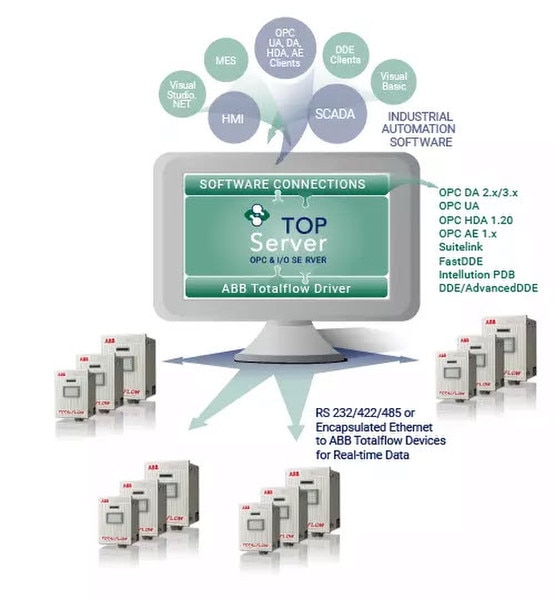
The TOP Server ABB Totalflow driver provides connectivity to ABB Totalflow devices using the native Totalflow DB1 and DB2 serial protocols including use with Ethernet/Serial converters or radios. This driver delivers native DB1 and DB2 serial protocol support with Ethernet/Serial converter and radio communications compatibility, enabling seamless integration with HMI, SCADA, Historian, MES, and ERP systems. When part of TOP Server EFM Suite, it provides historical EFM gas and liquid data collection with export to Flow-Cal, PGAS, and other industry-standard formats for production optimization and regulatory compliance. Totalflows are common in upstream oil & gas applications for process control and hydrocarbon measurement at the wellhead, as well as in midstream oil & gas facilities applications. With TOP Server's extensive driver list for PLCs and other control systems, you can integrate facilities into the same platform as your measurement and monitoring system.
Everything you need to get started, configure, and troubleshoot your driver
TOP Server How-To Videos / Tutorials
Main landing page with a library of how-to videos covering installation, general overview, troubleshooting tools, driver quick starts, and other TOP Server configuration topics
TOP Server How-To Application Notes
Support knowledge base with application notes, guides, and FAQs for TOP Server
TOP Server Quick Start Guide
A comprehensive video guide showing TOP Server basics, installation, and getting started with a sample project
TOP Server Troubleshooting Guide
Comprehensive guide to diagnose and resolve common issues
ABB Totalflow Driver Help File (PDF)
Complete driver documentation with setup instructions and configuration examples
Current/Past Release Notes
View the complete TOP Server release history and version information
Communication
Protocols Supported
ABB DB1 Serial, ABB DB2 Serial
Connection Types
Serial RS-232/422/485, Ethernet Encapsulation
Max Devices per Channel
1024 channels, 256 devices per channel
ABB Totalflow Flow Computers
6000 Series microFLO
6000 Series FCU
XSeries G5 (XFC^G5)
XSeries G4 (XFC^G4)
XSeries G3 (XFC^G3)
RMC-100 Remote Modular Controller
G2 FCUs
G1 FCUs
Note: For a complete list of supported models and firmware versions, please contact our technical support team or download the driver documentation.
Everything you need for reliable industrial connectivity
Maximum Channels & Devices
Support for up to 1024 channels with 256 devices per channel (practical limits vary by system resources)
EFM Capabilities
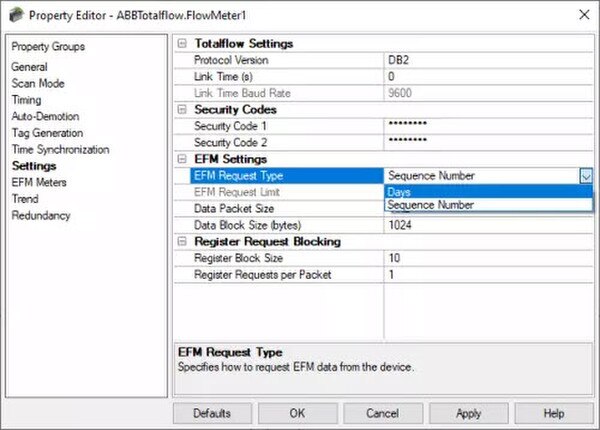
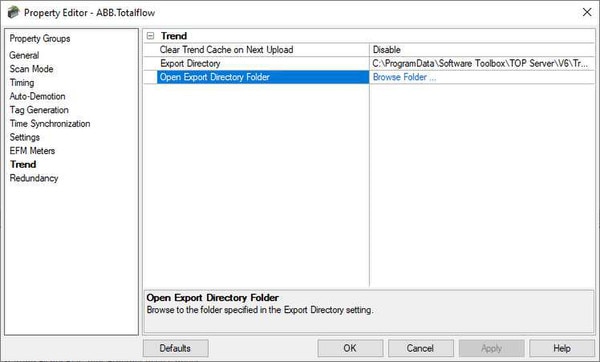
Supports DB2 Protocol EFM Collection by Day and Sequence Number with Trend Logs upload support
Advanced Protocol Features
User-defined block sizes configurable at runtime with communications serialization support
Flexible Network Options
Serial RS-232/422/485 and Ethernet Encapsulation with Dial-Up Modem Support
Configuration Flexibility
Security code support, configurable Inter-Device and Inter-Request Delay, configurable Link Time
Scan Mode Control
Supports scan mode for controlling client poll rates with adjustable RTS Flow timing for radios
Proven benefits that help you deploy faster and operate more reliably
Real-Time Data Connectivity
Native DB1 and DB2 serial protocol support with Ethernet/Serial converter and radio communications compatibility
Electronic Flow Measurement (EFM)
Historical EFM gas and liquid data collection with export to Flow-Cal, PGAS, and other formats (when part of EFM Suite)
Flexible Configuration
Security code support, configurable delays, and adjustable RTS Flow timing for radios
Industrial Reliability
Optimized for mission-critical Oil & Gas operations with extensive error handling
Enhance your connectivity with these complementary products and plug-ins (available at additional cost)
EFM Exporter Plug-In
Export historical flow measurement data to Flow-Cal, PGAS, and other industry formats
ODBC DataLogger Plug-In
Log Totalflow data directly to SQL databases for historical trending and reporting
OPC Alarms & Events Plug-In
Monitor and manage alarms from Totalflow devices with OPC AE support
Advanced Tags Plug-In
Create derived values and bridge data between Totalflow and other connected systems
Redundancy Plug-In
Implement failover capabilities for mission-critical Totalflow data collection
Remote Configuration Client
Configure TOP Server remotely for distributed Totalflow installations